LANCommander 2.1.0 Release Candidate 1 Release Notes
Breaking Changes
.NET 10
LANCommander has been upgraded from .NET 8 to .NET 10. This should be a seamless transition as all LANCommander binaries are self-contained and include the appropriate .NET runtime. However, if you are running an older version of Windows that does not support .NET 10, you may encounter issues running this version of LANCommander. The minimum supported Windows version is now Windows 10 version 1809.
Launching Into the Future
To kick things off, LANCommander 2.1.0 introduces a new launcher. As a recap, the previous launcher was built using .NET Blazor and wrapped into a Webview2 chrome using the open source project Photino. This decision was originally made in an effort to maintain a somewhat shared codebase with the server web UI.
Unfortunately, over time limitations of the platform made it apparent that a change had to be made. Community member aaronpowell stepped up and built out a proof of concept for a launcher using Avalonia, an open-source native cross-platform UI framework for .NET. The potential was immediately clear and the decision was made to jump in head first. The following months saw the project refocus on build a new launcher with a major emphasis on performance, reliability, design, and feature parity.
The result is, well, a project that went off a little off the rails in the best possible fashion:
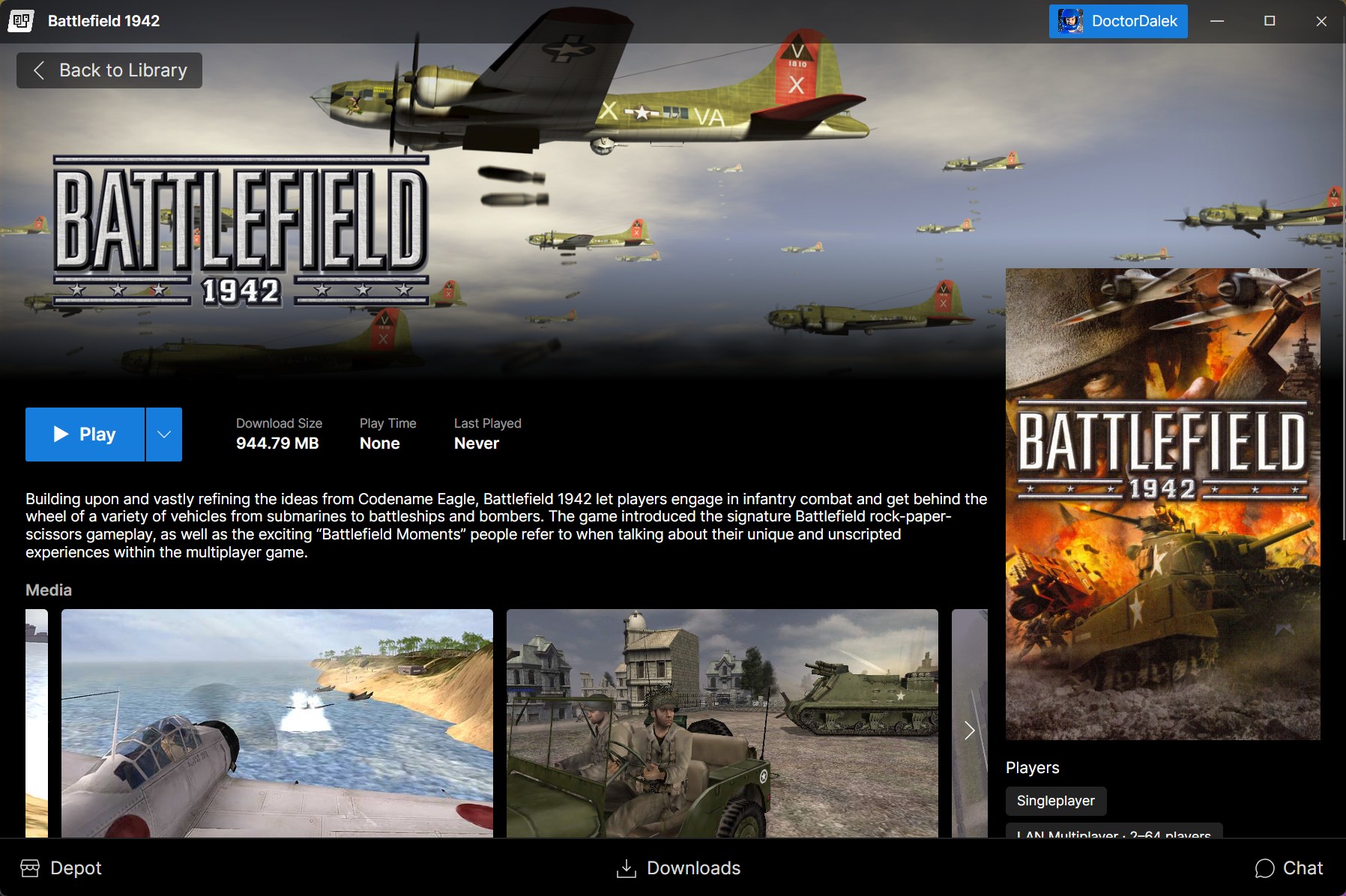
The brand new Avalonia-based launcher
I think the screenshots speak for themselves. Okay, not quite, there's a lot of fun stuff in this build so let's dive right in!
User Library
Previous versions of the launcher attempted to bring the art of a game to the forefront. These views are where most players spend their time interacting with the application. However, everyone's tastes are different. As such the library now contains three main views; cover grid, list, and shelf.
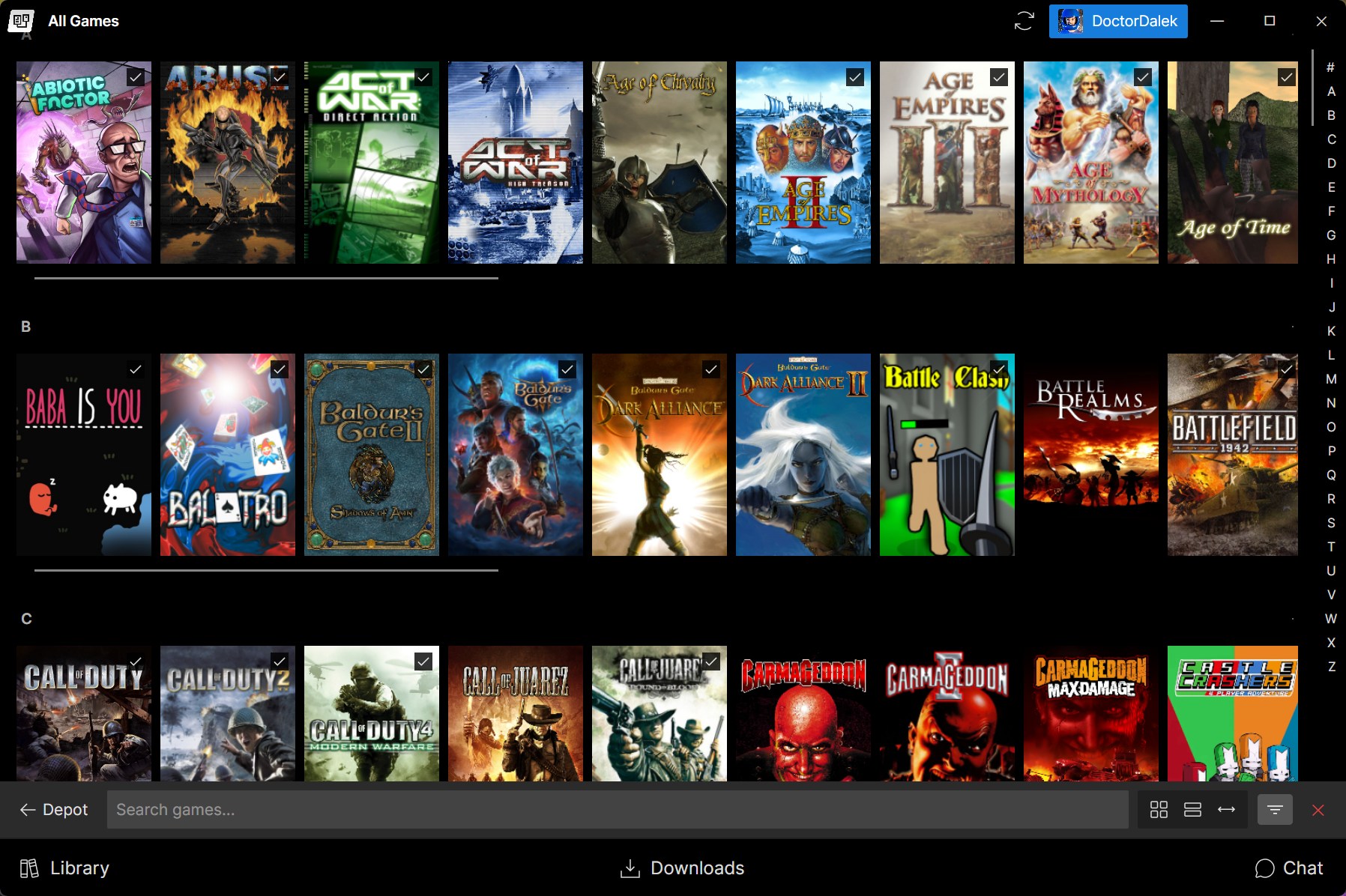
Game Details
Browsing the user library is great and all, but the detail view is where a game really gets to shine. Metadata has shifted to the right-hand side, descriptions now support more complex formatting with Markdown rendering support, and finally videos and screenshots are displayed in a carousel. A lightbox viewer lets you zoom in on screenshots, watch videos, and even read game manuals right from the detail view thanks to the new built-in PDF viewer.
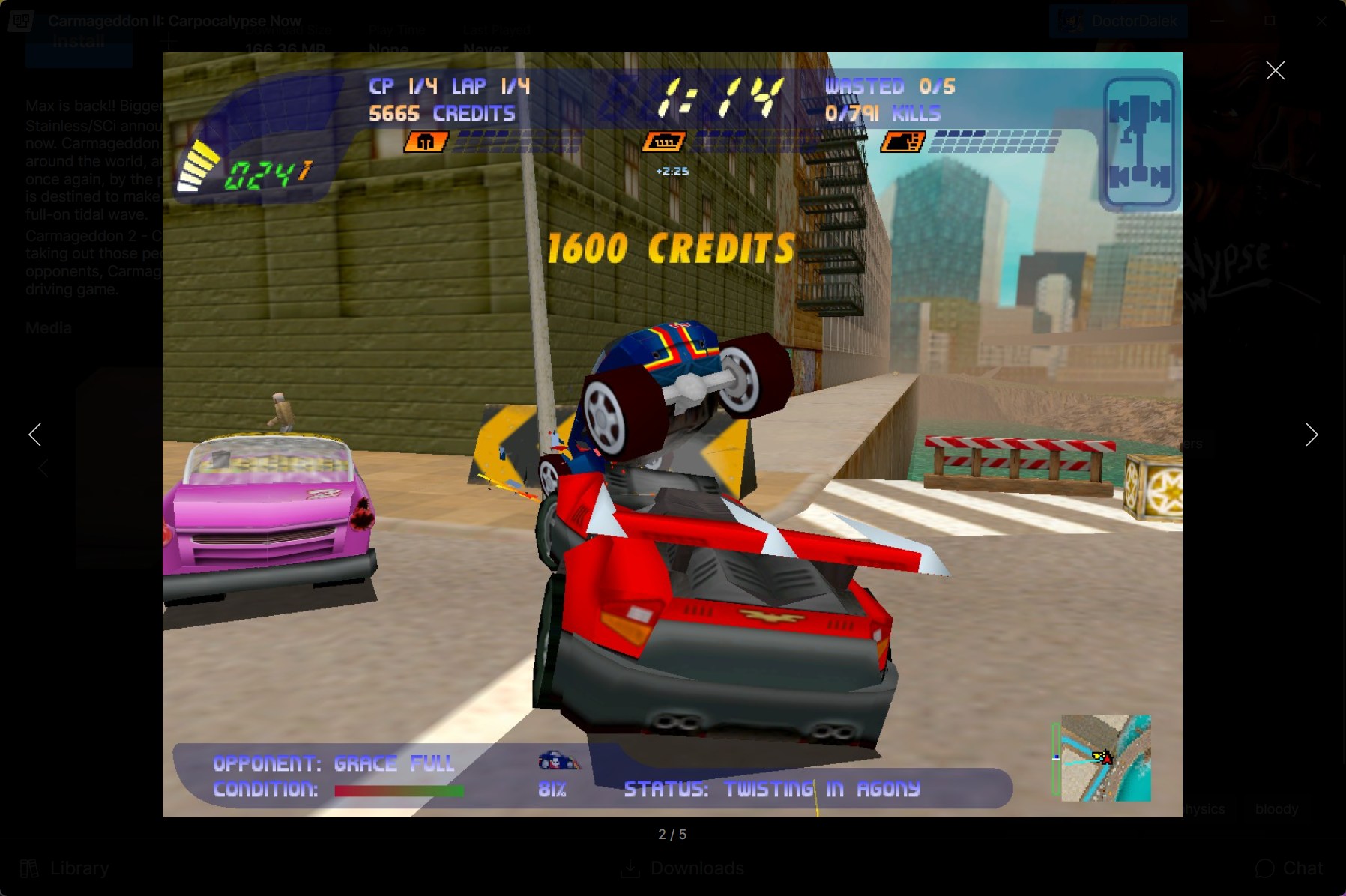
This is really just the start of something new. Expect this part of the launcher to be built out more in the future with better publishing tools and metadata expansion.
Depot
The depot has been overhauled too, probably more than any other part of the launcher. Previous iterations have been fine, but with large game sets it was hard to find just what you needed. The new depot puts a focus on categorization while maintaining granular filtering tools to get you exactly where you need to go.
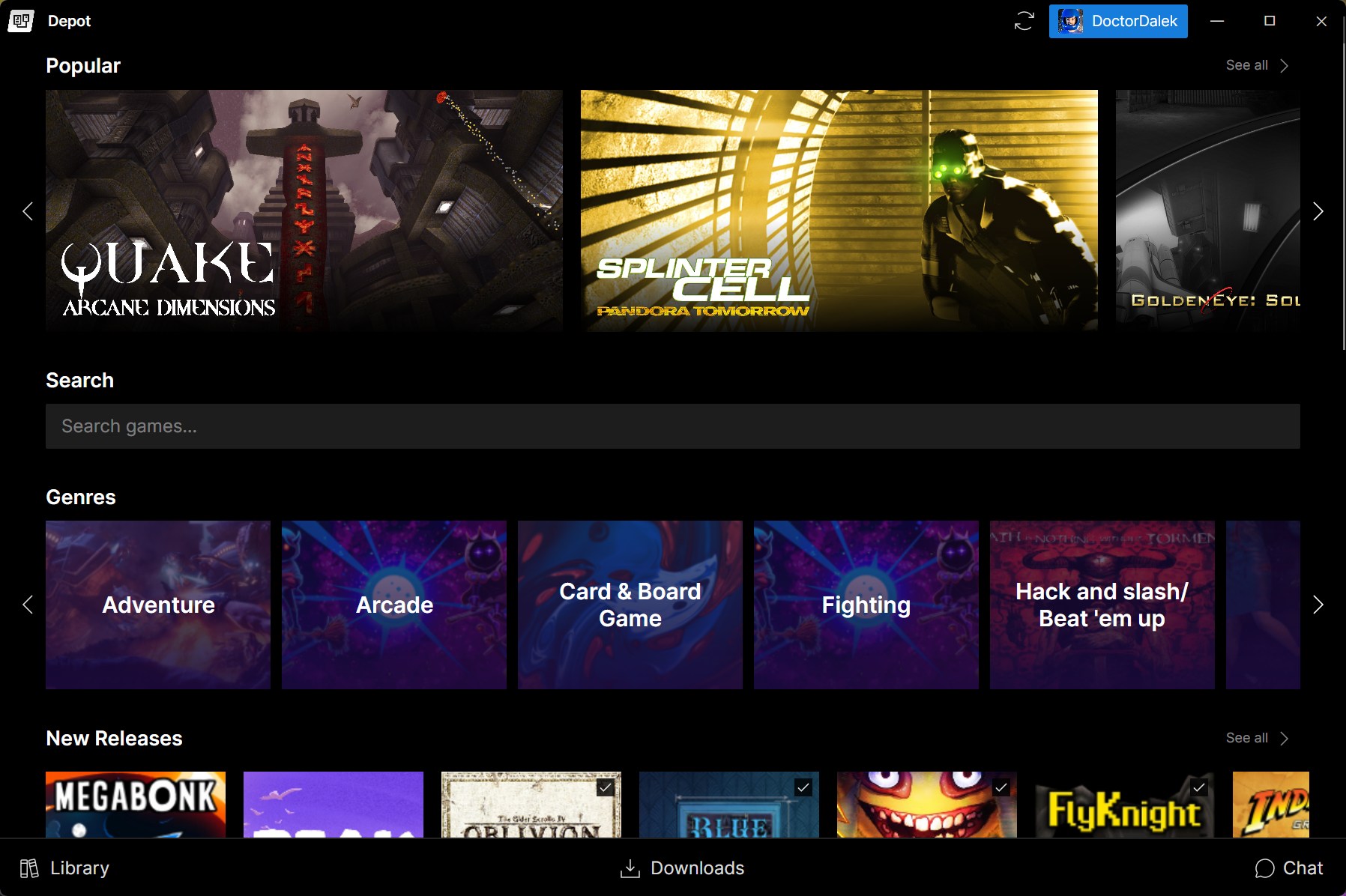
As you can see, this section more than any other benefits from high quality metadata. We'll get into that later, but first let's talk about game installation.
Download Queue
Game installation and downloading has been the hardest component to develop in the entire LANCommander platform. And rightly so! Without game installation, all you get is a fancy web UI and a pretty launcher that can't launch any games.
The LANCommander launcher is essentially a UI wrapper for the LANCommander SDK. The SDK is a .NET library that provides all of the useful bits of communicating with a LANCommander server install. Authentication, script execution, save management, game installation and so much more are provided through this library. In previous iterations, the SDK had a very strict execution plan for installing games. Often times this would lead to deadlocks and outright failures.
To resolve this in 2.1.0, the game install process has moved to a two-layer queuing system. The first layer of the queue manages what actually enters the download queue. This could be a game, redistributable, tool, or addon. The second layer handles any subprocessing step such as executing the different script types, save downloading, existing file verification, etc. The result is a system that is more transparent and reliable.
This queuing system has been exposed somewhat in the download queue:
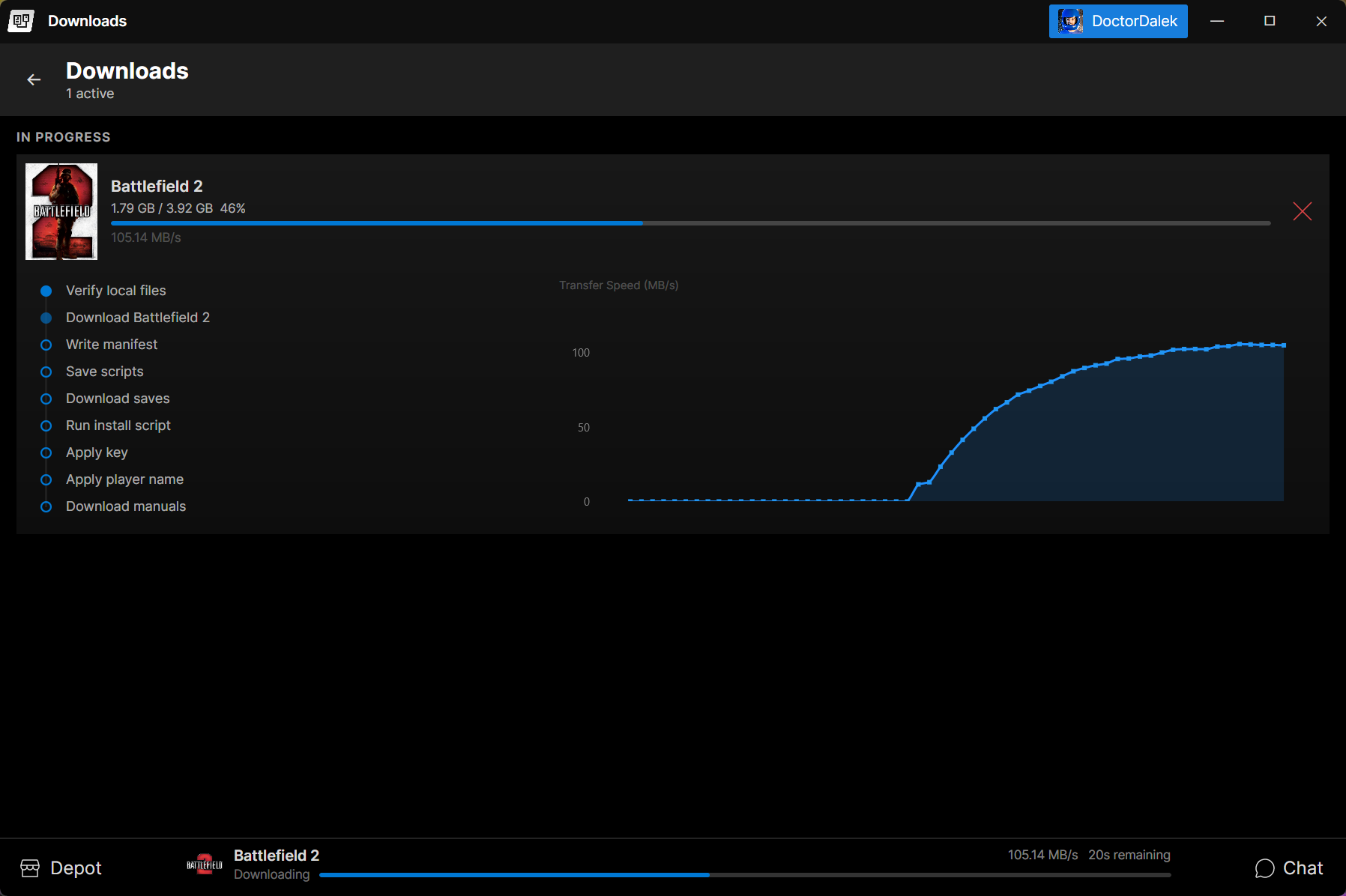
Each entry in the download queue will now report each step of the process during a game installation. In addition to looking a bit less mystical, this should give users an idea of what exactly is happening during a game installation.
Discord Rich Presence
The launcher now integrates with Discord Rich Presence. When you're playing a game through LANCommander, your Discord status will update to show what you're playing. By default this will show as LANCommander with the game name as the status. If the game is mapped to the correct Discord ID (via external IDs in the server), then the game's official Discord assets will be used for a more polished presentation.
Offline Mode
Previous attempts at an offline mode in the launcher were pretty clunky and unreliable. In 2.1.0, the launcher now has a proper offline mode that allows you to launch previously installed games even when the server is unreachable.
Single Sign-On
SSO was supported in the previous launcher, but it was a bit of an afterthought and not super reliable. In the new launcher it's been given more attention and should work as expected.
Chat
As with the last version, the chat functionality remains pretty barebones. This is an area that will get more attention in the future, but it is currently available in the new launcher. It might even work a little better.
Server Improvements
This release should also be pretty exciting for server admins. With a new launcher with shiny new features brings a set of tools to manage them.
LANCommander HQ
A new metadata provider has been added: LANCommander HQ. This gives server admins another option for sourcing game metadata and media alongside IGDB and SteamGridDB. In addition, support for external IDs beyond IGDB has been introduced, making it easier to cross-reference games across multiple platforms and services. To get started with the HQ, link your Discord account under "Integrations / HQ" in the server settings. Existing metadata providers such as IGDB and SteamGridDB are still available as well, so no functionality has been lost from previous versions.
Preview Tool
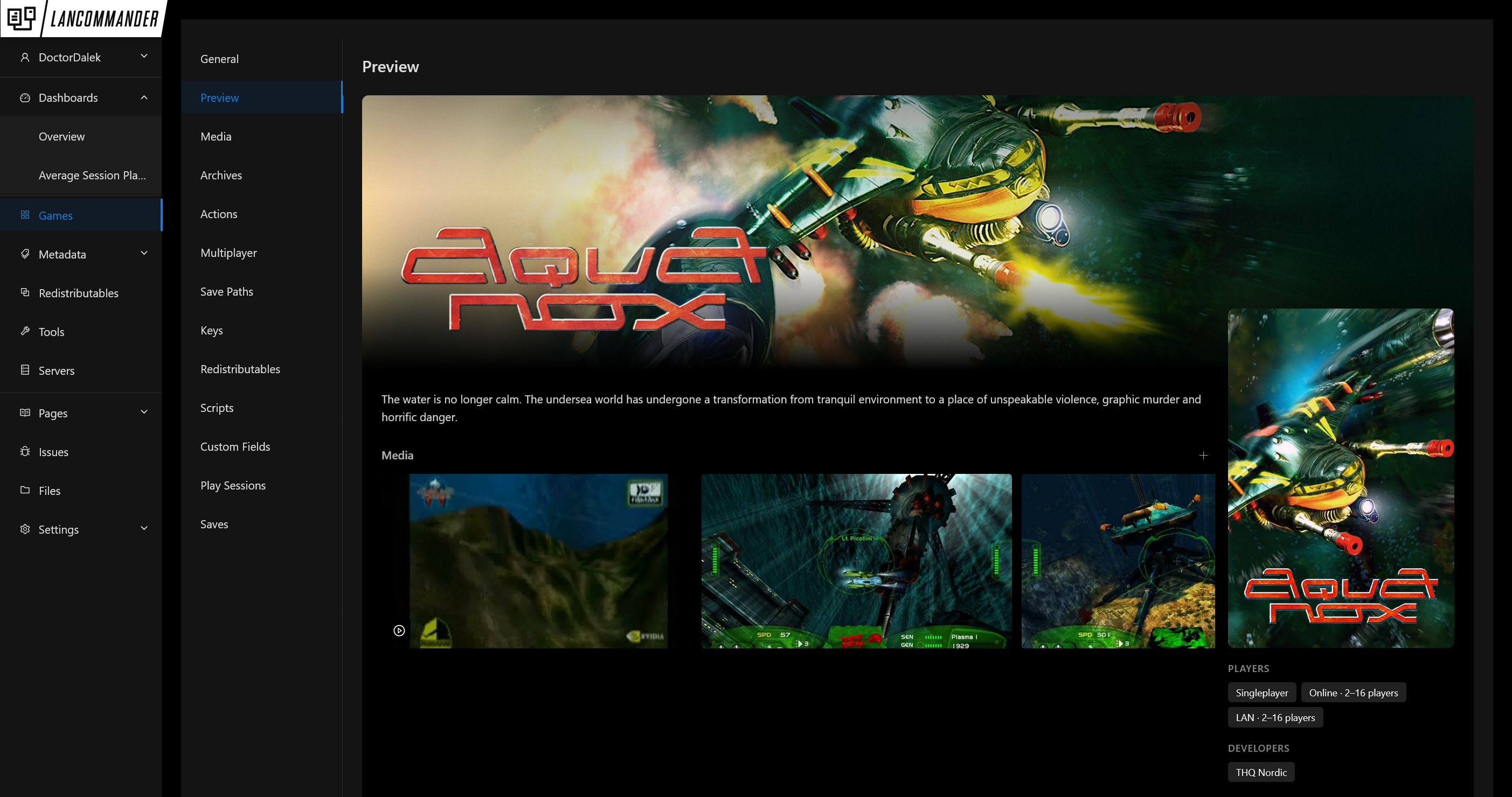
A new "Preview" editing view has been added to the server for managing game art. Inspired by the launcher's presentation, this tool gives admins a better sense of how their media will look in the launcher before publishing. Screenshots and videos can now be uploaded in bulk, and the media grabber supports selecting multiple assets at once. Animated covers are now supported as well, APNG images grabbed from SteamGridDB are automatically converted to video and should display in the new launcher.
Script Editor Improvements
The script editor has received a significant upgrade. Context-aware code completions now suggest built-in PowerShell cmdlets, LANCommander-specific variables, and generated type definitions. Validation has been improved, and script errors are now logged rather than silently swallowed. A new Set-GameDetails cmdlet has been added for specifying package details from within scripts.
Redistributable Options
Redistributables now support configurable options. Options can be defined with a schema editor, given display names, and are preserved across import/export. Assigning redistributables to a game can now be accessed under the "Redistributables" section of the game editor. When selected, a redistributable with options will render as an easy-to-use form and per-game overrides can be defined.
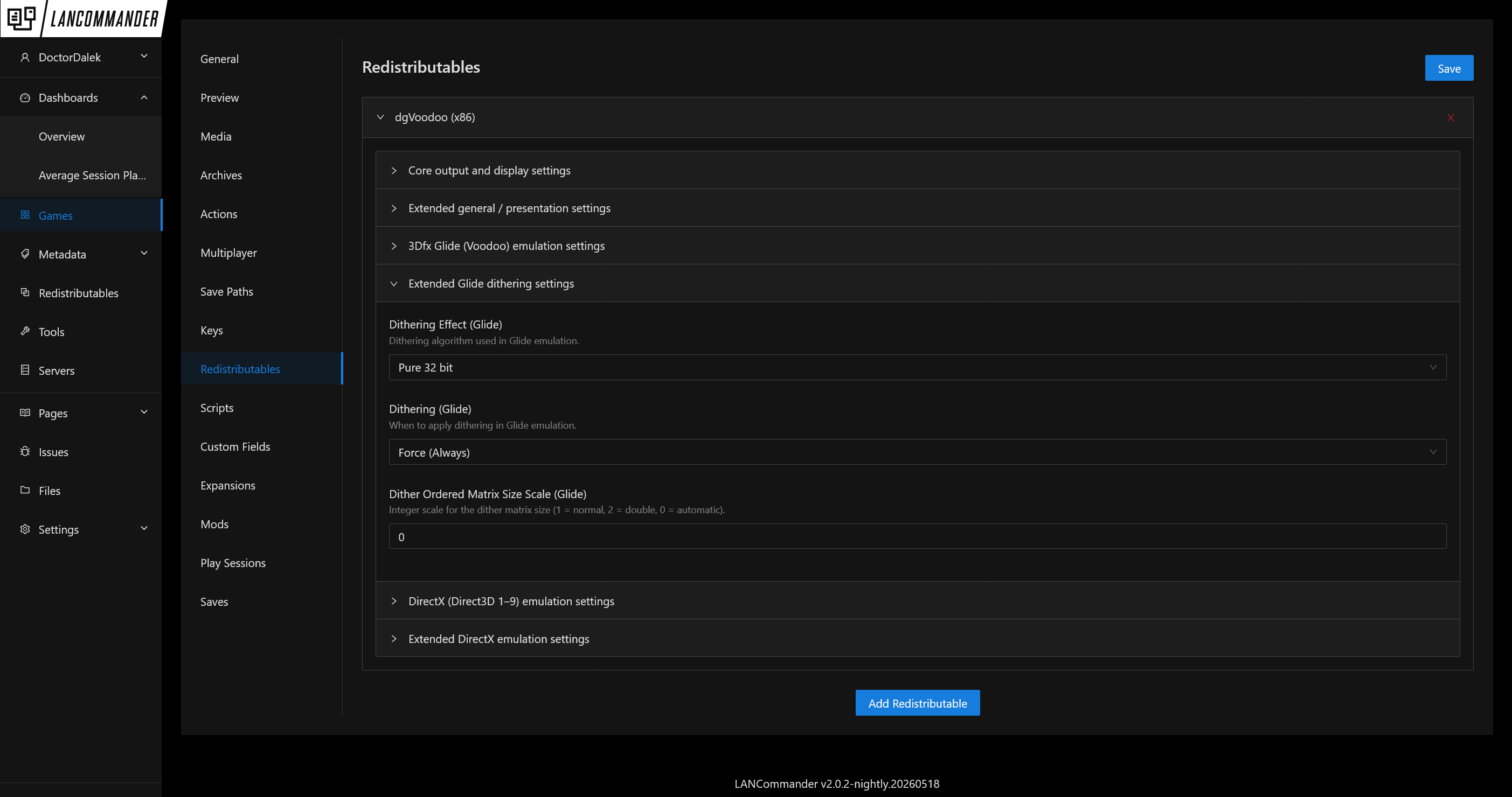
A new RunWrapper script type has been added as well, giving admins more control over how redistributables and games are executed. This should enhance redistributables to cover more use cases such as emulators, launchers, and compatiblity shims like Proton or dgVoodoo.
Key Management
Key allocation has been improved. The allocation method on keys is now nullable, and a new manual key assignment dialog has been added. The logic for choosing the next available key has also been reworked.
Media & Tooling
Server settings now include checks for ffmpeg and yt-dlp availability, with automatic installation support in Docker environments. A new streaming endpoint for media has been added, improving video playback in the launcher. Automatic downloads for Steam screenshots have been added as well. YouTube video support has been added to the media grabber, and ffmpeg is now used for video processing tasks such as APNG conversion and thumbnail generation.
LANCommander HQ
Last but far from least, this release coincides with the launch of LANCommander HQ, a new metadata provider and community hub for LANCommander users. The HQ aims to provide a centralized platform for game metadata and media across multiple providers, while also normalizing and enhancing that data with a focus on the needs of LANCommander users. There's a bit to cover, so let's dive in!
Metadata
LANCommander HQ aggregates metadata from multiple sources including IGDB, SteamGridDB, and user contributions. This data is then normalized and enhanced with a focus on the needs of LANCommander users. There are many metadata providers out there, and unfortunately they all have their own unique schemas and data quality issues. The HQ's goal is to provide a single source of truth for game metadata that can be consumed by LANCommander servers and launchers.
There are a lot of exciting features in the works for the HQ, but for this release the focus is on building out the core infrastructure and integrating with the new launcher. Expect to see more features and improvements in the future as the HQ continues to evolve.
Community
The main features of the HQ are currently focused on metadata, but there is the potential to expand it into a broader community hub for LANCommander users. This could include an area to share game configurations, scripts, and other resources. Additionally, there are some content moderation tools in place that should allow the HQ to host user-generated content and provide the best possible experience for all users. If you have a knack for curation and want to help out, there will likely be opportunities to get involved in the future!
Tiering / Subscriptions
The HQ operates on a tiered subscription model. Currently there are only two tiers: Basic (Free) and Premium ($5/month). The Basic tier provides access to the core metadata features of the HQ, while the Premium tier provides access to additional features such as enhanced metadata, relaxed rate limiting, and more. More information will be provided in the near future and will be provided on this site under the LANCommander HQ section. All paid subscriptions on the HQ are handled by Stripe, so every transaction is secure and your personal information is protected.
This subscription model is primarily in place to help cover the costs of running the HQ while also providing a sustainable path forward for continued development of LANCommander itself. This entire project is developed and maintained by essentially one person with some help from the community here and there. While this is a labor of love, there are real costs associated with running the infrastructure for the HQ and continued development of LANCommander. The subscription model is designed to be as accessible as possible while also providing a way for users to support the project if they find value in it.
As such, this will probably mean that the Patreon page will be going away in the near future. For existing patrons, it is recommended to switch over to the new subscription model on the HQ as it provides a more direct way to support the project and access the benefits of the HQ today.
Contributions
This release includes contributions from the following community members:
@aaronpowell | PR #395: Avalonia Launcher A substantial 42-commit, 6,000-line PR that bootstrapped the cross-platform Avalonia launcher. Aaron built out the core application structure, service wiring, and async initialization, and then built out the UI with filtered depot browsing and grid layout, a download queue, install/uninstall flows, a settings page, PDF manual viewer, game action bars, and a full CI pipeline for Windows, Linux, and macOS builds. A lot of the foundation that the current launcher sits on came from this PR.
@akifreak | PR #398: Fix Game Archive Upload Discovered that archive uploads through the web UI were silently broken after upgrading to v2.0.2, traced the problem through the JavaScript bundle, and submitted 11 targeted fixes rather than a single bug report. The fixes covered ES module loading, null-guards on DOM elements, a FileMode.Append seek conflict, incorrect archive ID passing, and error propagation throughout the upload pipeline. The uploading process should feel much more stable now!
@MasterMNB | PR #400: Avalonia Launcher Back Button
Improved the visibility and styling of the back button in the GameDetailView, which was previously hard to distinguish from the background. It's a small change, but it's a real usability improvement that makes navigation feel more intentional.
Changelog
Launcher
- Added: Brand new launcher built on Avalonia
- Added: Screenshots and videos in game detail carousel with lightbox viewer
- Added: Redesigned depot with categorization carousels and advanced filtering
- Added: Tools support
- Added: Download transfer speed graph
- Added: OS notifications upon game installation completion
- Added: Discord Rich Presence integration
- Added: Offline mode for playing games without server connectivity
- Added: SSO/OIDC external authentication provider support
- Added: Built-in PDF viewer for game manuals
- Added: Splash screen on startup
- Added: Verify files option in game dropdown
- Added: Markdown rendering for game descriptions
- Changed: Refactored game/redistributable/tool install process to two-layer queue system
- Changed: Imports should be faster and execute in the background without causing major UI hiccups
- Changed: Improved memory management with proper disposal of HTTP clients, RPC clients, and cancellation tokens
- Fixed: Installing games that already have files on disk will show the verification process during install
- Fixed: Logging in and logging out should no longer cause a hung UI
- Fixed: Install-uninstall-reinstall cycle no longer locks the game
- Fixed: Authentication token race condition causing crashes after login
Server
- Added: LANCommander HQ metadata provider support
- Added: Support for external IDs beyond IGDB
- Added: New launcher-inspired "Preview" tool for managing art
- Added: Context-aware script editor with code completions, validation, and PowerShell type definitions
- Added: Redistributable options with schema editor and display names
- Added: RunWrapper script type
- Added: Package versioning for archives
- Added: Bulk upload for screenshots and videos
- Added: Multiple select support in media grabber
- Added: Animated cover support (APNG auto-conversion to video)
- Added: Steam screenshot downloads
- Added: YouTube video support in media grabber
- Added: Media streaming endpoint
- Added: ffmpeg/yt-dlp availability checks and auto-install in Docker
- Added: Manual key assignment dialog and reworked key allocation
- Added:
Set-GameDetailscmdlet for package scripts - Fixed: Media uploads should now behave as expected
- Fixed: Game archive uploads in web UI
- Fixed: Orphaned files tool
- Fixed: Redistributable archive downloads
- Fixed: Script working directory for games
- Fixed: SteamCMD login when SteamGuard is enabled
- Fixed: Import file cleanup after completion
Infrastructure
- Upgraded to .NET 10
- Added ARM64 build support
- Removed legacy Photino launcher from CI
- Added nightly builds for Avalonia launcher
Downloads
Loading release downloads…